
TradingView to your broker
A TradingView alert can fire a webhook. Point it at your account's URL and it places an order.
Setting it up
Copy your webhook URL
from the Accounts & Webhooks page. Each connected account has its own.
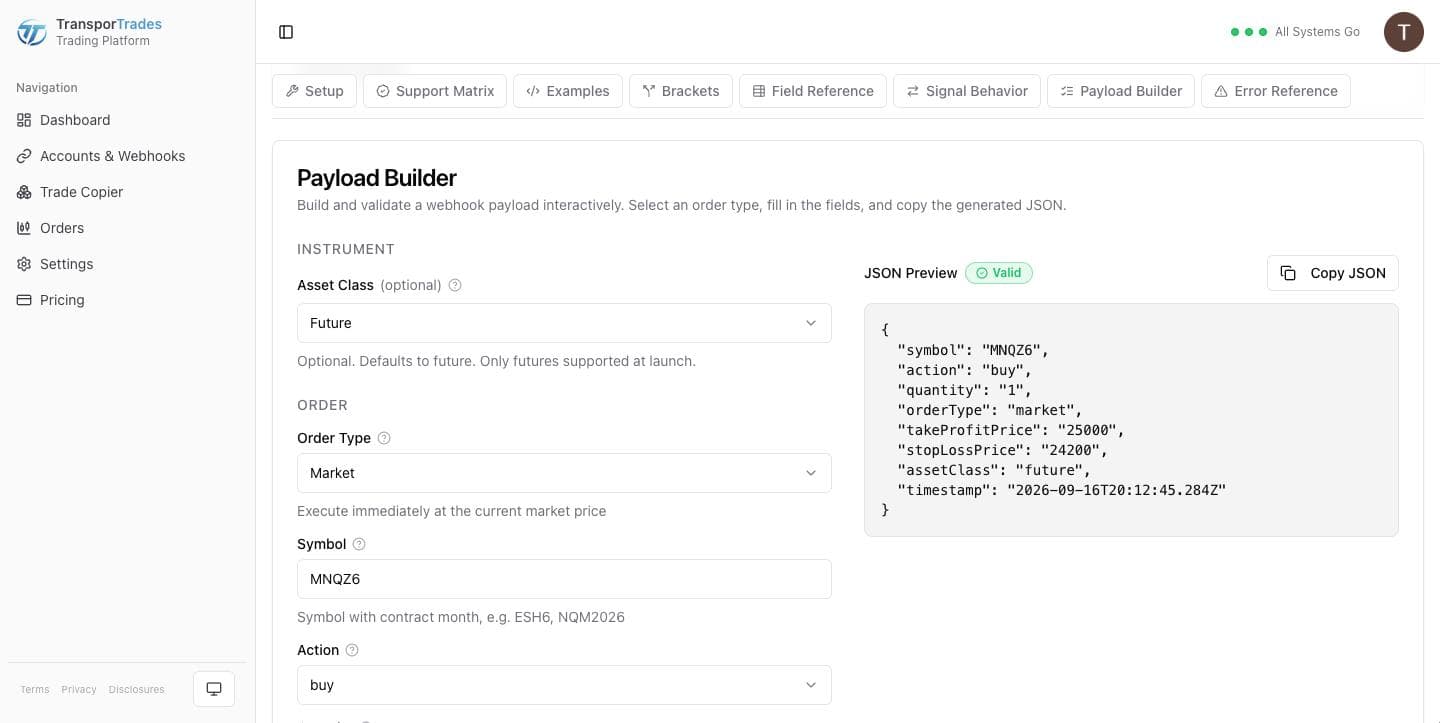
Build your payload
in the Payload Builder — order type, symbol, side, quantity, and any protection. Copy the JSON.
Create the alert
in TradingView. Paste the URL into the webhook field and the JSON into the message box.
The message box is the part people get wrong. TradingView's default message is plain text, and plain text isn't an order.
What TransporTrades does with the alert
Validates it, checks it against the account it arrived for, forwards it to your broker, and shows you the result with a status and a timestamp. If it couldn't go, the row says why in a sentence.
See how TradingView automation worksSee how it worksQuestions
Try it for free
Use the platform for 7 days completely free of charge, no credit card required.
* Routing only. Order acceptance, execution, and fill outcomes are determined by your broker, exchange, market conditions, and other factors outside our control.
NinjaTrader® is a registered trademark of NinjaTrader Group, LLC. TradingView is a trademark of TradingView, Inc. Tradovate is a trademark of Tradovate, LLC. TransporTrades is not affiliated with, endorsed by, or sponsored by any of these companies. See our full Third-Party Trademarks.