
Tradovate, automated and under your hand
Connect a Tradovate account, enable its webhook, and your signals place orders. Demo or live, retail or prop.
What's supported
Order types — market, limit, stop and stop limit, with take profit and stop loss attached as absolute prices or offsets.
Account types — demo and live. Prop accounts connect like any other Tradovate account.
Asset class — futures.
Accounts per group — one Leader and up to nine Followers, across different logins.
Connecting
Link your Tradovate account once on the Accounts & Webhooks page. Each connected account gets its own webhook URL — the URL is the account, which is how the platform knows where an order goes. Keep it private; anyone with it can send signals to your account.
See how it works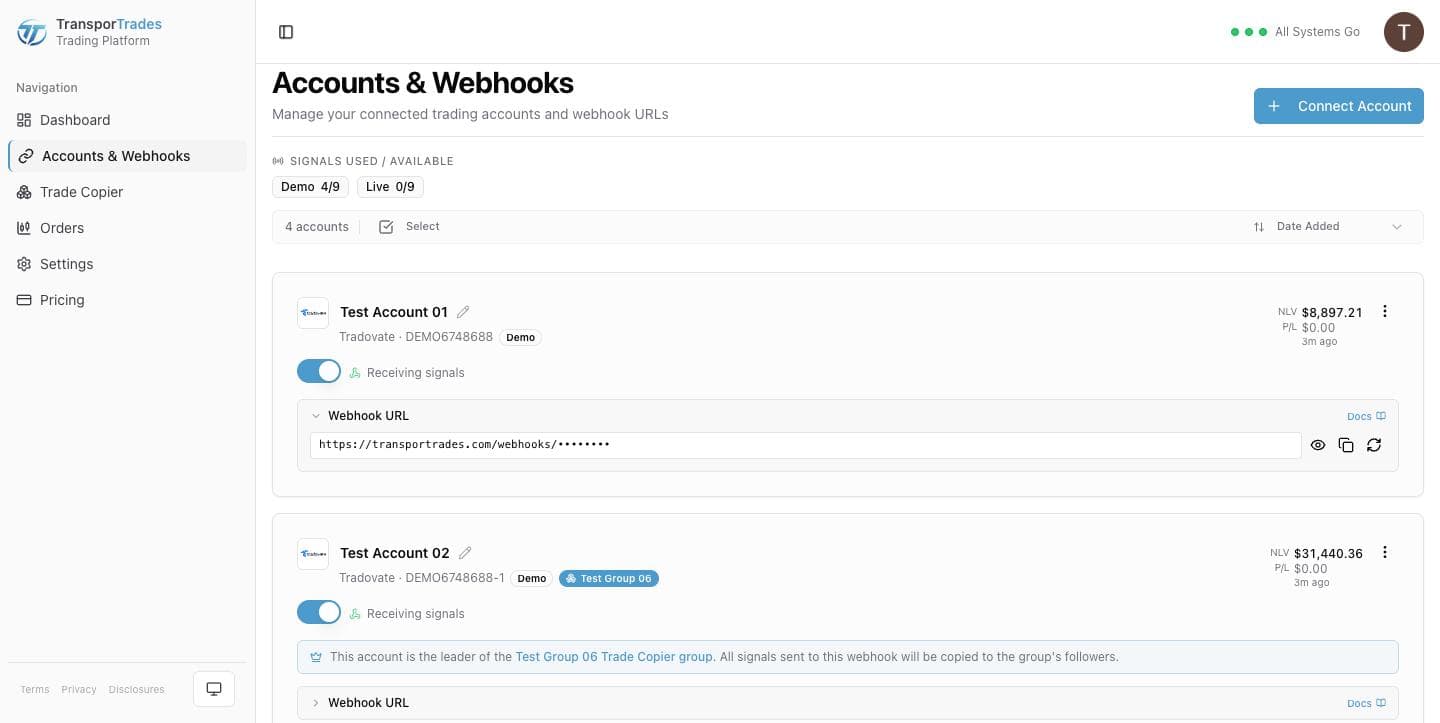
Prop accounts on Tradovate
Most funded futures accounts in this market sit on Tradovate, which is why the platform was built here first.
A prop account connects the same way a retail one does. What differs is your firm's rules, which are the firm's to set and change.
Automated and copy trading rules vary by firm. Verify your firm's policies before you automate or copy trades.
See which firms we can reachManaging the trade
Once an order is working, it's yours. Change the quantity, move the entry, add or remove a take profit or stop loss, cancel, or close — from the same screen the automation runs on.
Learn more about manual controlsQuestions
Try it for free
Use the platform for 7 days completely free of charge, no credit card required.
* Routing only. Order acceptance, execution, and fill outcomes are determined by your broker, exchange, market conditions, and other factors outside our control.
TradingView is a trademark of TradingView, Inc. Tradovate is a trademark of Tradovate, LLC. TransporTrades is not affiliated with, endorsed by, or sponsored by any of these companies. See our full Third-Party Trademarks.